A buyer standing in a driveway with a phone in one hand and a coffee in the other will not pinch, zoom, and scroll through an 80-page PDF. They will skim for ten seconds, feel confused, and call their agent in a panic. That gap between what inspectors produce and what buyers can actually read is where deals wobble. This article shows how home inspectors close it, using layouts, photo habits, and tools like Flipbooks AI that make a report feel native on a small screen.

Why Phones Are the Real Reader
Most buyers open their report within minutes of receiving the email. Often that happens on a phone, between showings, at work, or on the couch after dinner. Agents forward the link to lenders, partners, parents, and contractors, and each of those people opens it on whatever device is closest.
A traditional PDF was designed for letter-size paper. On a six-inch screen, the text shrinks to a size nobody can read, tables spill off the edge, and photos load slowly. The buyer concludes the house is full of problems simply because the report feels overwhelming.
The Cost of an Unreadable Report
An unreadable report creates real business damage for a small inspection company:
- Extra phone calls. Buyers call to ask what a finding means because they could not read it.
- Renegotiation stress. Misread items get inflated into deal-breakers.
- Fewer referrals. Agents recommend inspectors whose reports their clients praise.
- Lower review scores. "Hard to follow" shows up in online reviews more often than "missed a defect."
What Buyers Actually Want
Buyers are rarely looking for every detail. They want answers to three questions: Is this house safe? What needs fixing soon? What will it cost? A phone-readable report answers these in the first screen, then lets curious readers dig deeper.
💡 Pro tip: Put a one-screen summary at the very top. If a buyer sees nothing else, they should still know the three biggest issues and the rough urgency of each.
What Makes a Report Phone Friendly
Phone-first does not mean shorter. It means structured so a reader can find what matters with a thumb.

Large Type and Short Blocks
Body text should be readable without zooming. Keep paragraphs to two or three sentences. Use one finding per screen where possible, so the reader is never hunting through a wall of text.
One Photo, One Finding
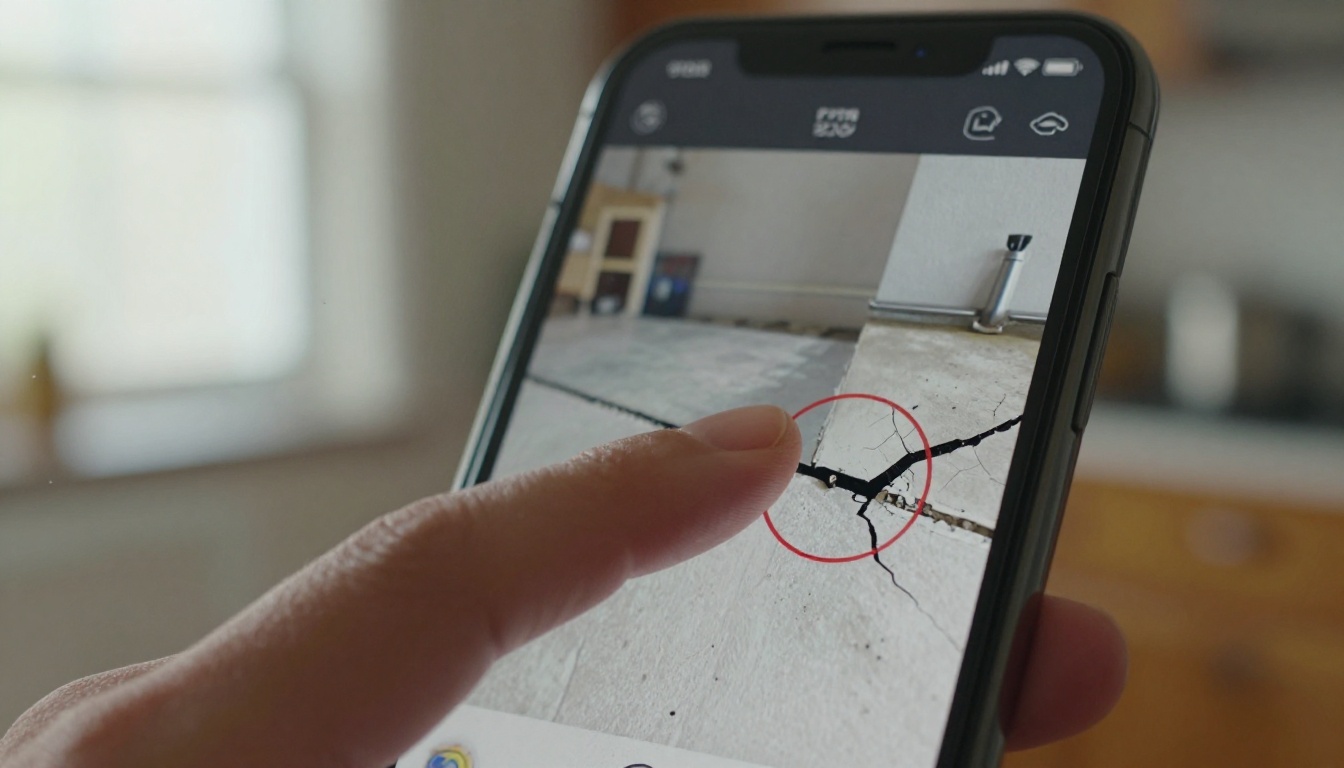
A photo should sit right beside the defect it shows, not on page 47. Crop tightly, circle or arrow the issue, and add a single-sentence caption. Wide shots of a whole room do not help a buyer see a hairline crack.
Color-Coded Severity
Use a simple, consistent system. Red for safety or urgent items, orange for repair soon, yellow for monitor, and green for good condition. Buyers learn the system in seconds, and it lets them triage on their own.
Tap-Friendly Navigation
A table of contents with tappable links saves enormous scrolling. Jumping straight to "Roof" or "Electrical" feels like using an app rather than reading a document.
Inspectors have three main ways to deliver findings. Each has trade-offs, and the right choice depends on software, budget, and client comfort.
| Format | Phone Readability | Load Speed | Setup Effort | Branding Control | Best For |
|---|
| Standard PDF attachment | Poor, requires zooming | Slow with many photos | Very low | Limited | Quick, simple jobs |
| Inspection software web portal | Good | Fast | Medium, tied to software | Moderate | Inspectors already on a platform |
| Responsive flipbook | Very good, reflows to the screen | Fast, pages load as needed | Low, upload a PDF | High, custom colors and logo | Inspectors who want a branded link |
The takeaway: you do not have to abandon your current report software. Many inspectors keep exporting a PDF and then convert it into a responsive link. The PDF to Flipbook Converter handles exactly that step.

Building the One-Screen Summary
The summary is the most important page you will write. It should be readable in thirty seconds and honest enough that nothing later feels like a surprise.
The Top Five Format
List the five most significant findings in plain language. For each, include what it is, why it matters, and a rough urgency level. Skip jargon. "Active moisture at the north basement wall" beats "efflorescence observed with elevated moisture meter readings."
Plain Language Over Trade Terms
Technical terms belong in the detailed section. In the summary, translate. If you must use a term like "GFCI," add a short phrase: "a safety outlet that cuts power if it detects a shock risk."
Example Summary Layout
| Priority | Finding | Why It Matters | Typical Next Step |
|---|
| Urgent | Missing handrail on stairs | Fall risk | Install before move-in |
| Soon | Aging water heater, 14 years old | Likely failure within 1 to 2 years | Budget for replacement |
| Soon | Roof flashing gap at chimney | Water entry during storms | Roofer repair quote |
| Monitor | Hairline crack in garage slab | Common, usually cosmetic | Re-check yearly |
| Good | Furnace serviced and clean | No action | None |
✅ Best practice: End the summary with a sentence that tells buyers what is normal. Reassurance is part of the job, and it prevents unnecessary panic.
Photo and Video Habits That Work on Small Screens
Photos are the heart of a phone-readable report. Done right, they replace paragraphs of description.
Shoot With the Small Screen in Mind
Get close. A defect that fills a third of the frame will still be visible on a phone. Take one wide shot for context and one tight shot for detail. Good light matters, so use a bright flashlight in dark spaces like crawlspaces and attics.
Annotate Every Defect
Add a red circle or arrow to every issue photo. Without a marker, buyers scan the image trying to guess what you meant. A short caption of ten words or fewer finishes the job.
Short Clips for Complex Issues
A fifteen-second clip of water dripping from a pipe tells the story better than a paragraph. Keep clips short, since buyers on mobile data will skip anything that buffers. Platforms that let you embed video inside the report, like Flipbooks AI, keep everything in one link.

Drone Shots for Roofs
Where legal and safe, aerial photos show roof condition without anyone climbing. They also read well on a phone because the whole story is visible in a single frame.
How to Create a Mobile Report with Flipbooks AI
If your inspection software exports a PDF, you can turn it into a responsive, branded link in a few minutes. Here is the workflow most small inspection businesses use.

Step 1: Create Your Account
Head to Flipbooks AI and sign up. You can try the platform before committing to a plan, and no watermarks are added to your reports.
Step 2: Upload the PDF
Export the final inspection report from your software and upload it. The platform converts each page into a flipbook page that reflows nicely on phones, tablets, and desktops. For reports with many photos, conversion usually takes under a minute.
Step 3: Customize the Look
Add your logo, brand colors, and a cover page. Pick a page-turn effect that feels calm and professional rather than flashy. Consistent branding makes each report feel like it came from a serious company.
Step 4: Add Multimedia
Embed short video clips for complex findings, such as a sagging beam or an active leak. You can also add audio notes if you like to walk clients through the top issues in your own voice.
Step 5: Choose Sharing Settings
Inspection reports are private. Turn on password protection so only the buyer, their agent, and their lender can open the link. Then copy the direct link for email or text, or use an embed code if you host reports on your own website. The Embed Flipbook on Website tool explains the embed option.
Step 6: Track and Follow Up
On the Professional plan, analytics show whether the buyer opened the report and which pages they read. If a client never opens it, you know to send a friendly reminder. Compare options on the pricing page. Offline downloads let buyers keep a copy for the contractor visit, even in a basement with no signal.
💡 Pro tip: Send the link by text message with a single sentence: "Here is your inspection report. Start with page 2 for the summary." Short instructions increase the chance it gets read.
Delivery Habits That Build Trust
A readable file is only half the story. How and when you deliver it shapes how buyers feel about the findings.

Walk Them Through It Live
If the buyer attends the inspection, show the top findings on their phone before you leave. Open the draft summary together and point out the three most important items. People retain far more when they see the issue and hear the explanation together.
Send Within Twenty-Four Hours
Speed signals professionalism. Agents love inspectors who deliver the same day, and buyers on tight option periods need time to negotiate. A mobile-friendly format also means you can send from the truck without a laptop.
Include the Agent
Copy the buyer's agent on the link. They guide the negotiation, and a clean report makes their job easier. Agents who see readable reports tend to recommend the inspector again.
Delivery Timeline Example
| Time After Inspection | Action | Result |
|---|
| On site | Show top findings on the phone | Buyer feels informed immediately |
| Within 3 hours | Send the draft summary link | Fast reassurance |
| Within 24 hours | Deliver the full branded report | Meets typical option period needs |
| Day 3 | Friendly follow-up text | Catches unopened reports |
Common Mistakes to Avoid
Even well-meaning inspectors repeat the same errors. Watch for these three:
- Sending raw software exports. Default templates often prioritize completeness over readability. Edit before you send.
- Burying the summary. If the buyer must scroll past ten pages of boilerplate, they will not reach it.
- Using alarming language for minor items. Words like "severe" and "critical" should be reserved for real hazards.
⚠️ Warning: Never remove or soften a safety finding to make a report look friendlier. Readability should clarify the truth, not hide it.

A Quick Phone-Test Checklist
Before sending any report, open it on your own phone and check:
- Can you read body text without zooming?
- Does the summary appear within the first two screens?
- Do all photos load in a few seconds on cellular data?
- Can you jump to any section from the contents list?
- Does the link ask for a password if it should?
Real-World Scenarios
A solo inspector converts each Friday inspection into a branded flipbook link, texts it to the buyer from the driveway, and gets fewer clarifying calls on Monday.
A three-person inspection firm standardizes one layout so every inspector's report looks identical. Agents learn to recognize it, and the brand becomes a selling point.
An inspector specializing in older homes embeds short clips of foundation movement, helping buyers see why a structural engineer is recommended instead of just reading about it.
Inspectors who also work with brokerages can pair reports with a Real Estate Brochure for listings, giving agents consistent, polished materials across the transaction.
Ready to Make Reports Easier to Read?
Your findings are only as useful as the buyer's ability to read them. Converting your next report takes a few minutes, and the difference shows up in fewer confused calls and warmer reviews.
- Create your account and upload your first report.
- Browse the full list of flipbook tools for brochures, price lists, and more.
- Compare pricing plans to see which features, like analytics and unlimited flipbooks, fit your business.
Send your next report as a link buyers can actually read, and let the quality of your inspection speak for itself.



