A buyer opens your email, scans the attachment for about ten seconds, and decides whether you earn a meeting or a polite silence. What they scan is your line sheet. If the wholesale price is missing, the delivery window is vague, or the photos are cropped inconsistently, the sheet goes into a folder and never comes back out. This article gives you a line sheet template for fashion brands built around the exact fields retail buyers check, and shows how to publish it as a page-turning document with Flipbooks AI so it opens instantly on any device.
What a Line Sheet Actually Does
A line sheet is a short, structured document that summarizes a collection for wholesale buyers. It is not a lookbook and it is not a consumer catalog. A lookbook sells a mood. A line sheet sells a decision: yes, I will order this, in these quantities, for this season.
Buyers receive dozens of them each market week. They compare brands side by side, so they want the same information in the same place every time. That is why a predictable template beats a creative layout almost every time.
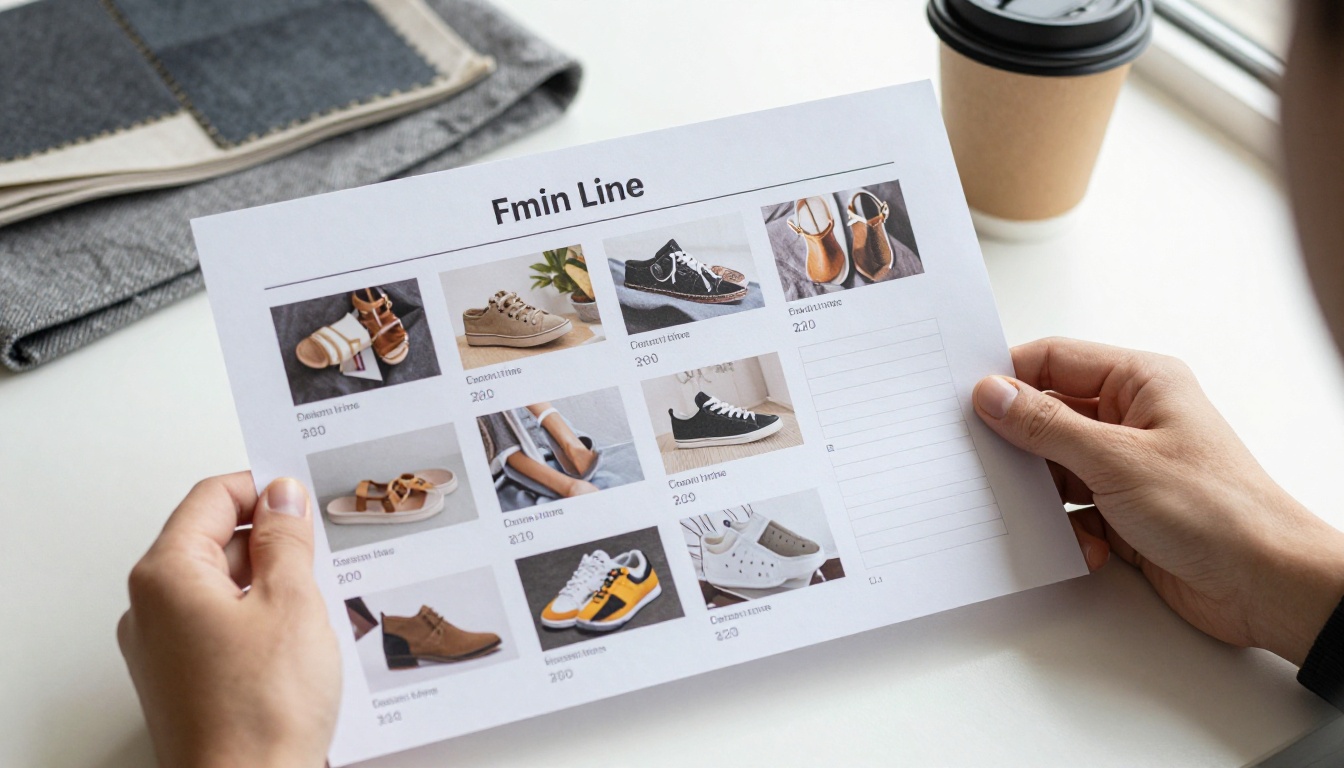
Line sheet vs lookbook vs catalog
| Document | Purpose | Audience | Includes prices |
|---|
| Line sheet | Drive wholesale orders | Retail buyers | Wholesale and MSRP |
| Lookbook | Show styling and mood | Press, buyers, fans | Rarely |
| Consumer catalog | Sell directly | Shoppers | Retail only |
| Order form | Capture quantities | Buyers ready to buy | Wholesale |
Many brands send a lookbook first and a line sheet second. The strongest approach is to bundle both: lookbook pages for the story, line sheet pages for the numbers.
One page per style or a grid?
Both work. A grid of six to nine styles per page suits small collections and fast scanning. One style per page suits higher price points, where the buyer wants to inspect detail shots and fabric notes. Pick one layout and keep it for the whole sheet.
The Fields Buyers Check First
Buyers read a line sheet like a checklist. They look for the same items in roughly the same order. Miss one and they have to email you, and most will not bother.

Product identification
- Style number: a unique code per style, such as SS27-DR-014. Buyers use it to write orders.
- Style name: short and memorable, for example "Marlow Wrap Dress".
- Product photo: clean, consistent, front view at minimum.
- Category and fit: dress, knit, outerwear, regular or relaxed.
Pricing fields
- Wholesale price: what the retailer pays per unit.
- MSRP (suggested retail): what the shopper pays. Most brands keep a keystone markup, so wholesale is roughly half of MSRP.
- Currency and terms: state the currency, and whether prices exclude duties and freight.
Variant fields
- Colorways: names and swatches, not just "blue".
- Size range: XS to XL, or numeric sizes, plus any size run limits.
- Fabric and composition: "92% organic cotton, 8% elastane" tells a buyer more than "soft knit".
- Care and origin: wash instructions and country of manufacture.
💡 Pro tip: Put wholesale price and MSRP side by side under every photo. Buyers do the margin math in their heads, and making them hunt for a number costs you the order.
The Template Fields in One Table
Copy this structure into a spreadsheet or design file. Each row is a field, and the last column tells you why a buyer cares.
| Field | Example | Why buyers check it |
|---|
| Style number | SS27-DR-014 | Needed to write the order |
| Style name | Marlow Wrap Dress | Easy reference on calls |
| Wholesale price | $68.00 | Margin and budget |
| MSRP | $138.00 | Shelf price fit |
| Colorways | Sage, Ink, Sand | Assortment planning |
| Size range | XS to XL | Store customer fit |
| Fabric | 100% Tencel | Quality and positioning |
| Case pack | 1 per color per size | Ordering logic |
| Minimum order | $600 per brand | Whether it is viable |
| Delivery window | Feb 15 to Mar 10 | Floor calendar |
| Lead time | 90 days | Reorder planning |
Terms That Decide the Order
Buyers can love a product and still pass if the terms do not work for their store. Put these on page one or in a footer on every page.

Minimums and case packs
State your minimum order value (for example $500 to $1,000 for a small boutique) and any minimum units per style. If you sell in size runs, say so clearly. A boutique with six feet of rail space cannot absorb a dozen units of one dress.
Delivery windows and lead times
Fashion retail runs on seasons, and a late delivery is a lost season. List a delivery window per drop and your production lead time for reorders. Buyers compare these against their open-to-buy calendar.
Payment and shipping terms
- Net 30 or Net 60 for established accounts
- Prepayment or deposit for first orders
- Freight policy: prepaid over a threshold, or collect
- Return and damage policy in one sentence
⚠️ Warning: Do not hide minimums at the bottom of page eleven. Buyers who find them late feel misled, and they remember.
Design Rules That Keep Buyers Reading
A line sheet is a working document, so clarity wins over decoration. A few simple rules do most of the work.

Keep photography consistent
Use the same background, crop, and lighting for every style. Inconsistent photos signal an inconsistent brand. If you are still building your image set, a Fashion Catalog creator layout helps keep product grids aligned.
Show detail, not only the full look
Include at least one detail shot for items where construction matters: stitching, trims, hardware, prints. A buyer cannot touch the garment, so the photo has to do that job.

Group by story, not by chance
Order styles by drop or theme, then by category. A buyer should be able to say "I want the whole Sage story" and find it on two adjacent pages.
Checklist before you send
- Every style has a unique number.
- Every price is labeled wholesale or MSRP.
- Every colorway is named.
- Minimums, lead times, and delivery windows appear on page one.
- Contact details and your order email appear on every page.
- The file opens on a phone in under three seconds.
Mistakes That Lose Buyers
Most rejected line sheets fail for boring reasons. Here are the three that show up most often.
Missing or unclear pricing
Showing only MSRP forces the buyer to guess your wholesale margin. Showing a price range instead of a number looks evasive. Be specific.
Oversized files
A 60 MB PDF that bounces from corporate email is a lost sale. Compress images, or host the sheet online and send a link instead.
Stale information
Prices change, colorways sell out, and delivery dates slip. A static PDF in someone's inbox keeps showing last month's facts. A hosted version that you update in place avoids the problem.
| Mistake | What the buyer thinks | Fix |
|---|
| No wholesale price | "I will have to chase this" | Show wholesale and MSRP |
| Huge attachment | "It will not open" | Compress or host online |
| Mixed photo styles | "Unpolished brand" | One crop and background |
| Hidden minimums | "Not transparent" | Put them on page one |
| Outdated sizes | "They cannot keep stock" | Update in one live link |
Real-World Examples
A contemporary womenswear label with 24 styles sends a two-page-per-category line sheet before a regional trade show. Each page carries six styles, with style numbers, both prices, and colorways. Buyers book appointments from the email alone.
A small knitwear brand sells to 15 independent boutiques. Its line sheet leads with a minimum of $500 and a lead time of 60 days, which pre-qualifies buyers before the first call.
An accessories designer attaches a hosted version to every outreach email. When a leather colorway sells out, the update goes live for every buyer at once.

Turn It Into a Flipbook
A PDF line sheet works, but a flipbook works better for outreach. It opens in the browser, looks sharp on a phone, and can be updated without resending anything. Here is how to build one.
How to create a line sheet flipbook
- Build the sheet in your design tool or a spreadsheet export, using the field table above.
- Export as PDF at screen quality, with one style grid per page.
- Open Flipbooks AI and create an account.
- Upload the PDF to the PDF to Flipbook Converter. Pages convert into a flipbook in moments.
- Customize the look with your logo, brand colors, and page-turn effects. Add short product videos or audio notes if a style needs them.
- Share it: send a direct link, or use the embed option to place it on your wholesale page.
- Protect it: turn on password protection so only approved retailers see wholesale prices.
- Track it: on the Professional plan, analytics and lead generation show who opened the sheet and which pages held attention. Compare options on the pricing page.
✅ Best practice: Keep one public lookbook flipbook without prices, and one password-protected line sheet flipbook with wholesale numbers. Send the right one to the right audience.
The Digital Catalog Maker and Interactive Lookbook Designer are both worth a look if you want to pair the two documents. No watermarks appear on your pages, and the layout adapts to mobile screens automatically.

PDF vs flipbook for line sheets
| Feature | Static PDF | Flipbook |
|---|
| Opens on mobile | Often slow | Fast and responsive |
| Update after sending | No | Yes, same link |
| Password protection | Limited | Built in |
| Open and page tracking | No | Yes (Professional plan) |
| Embed on your website | No | Yes |
| Offline download | Yes | Yes |
Build Your Season Workflow
A good line sheet is a repeatable process, not a one-off project. Build it once and refresh it each season.
A simple season timeline
- Ten weeks before market: lock styles, costs, and wholesale prices.
- Eight weeks before: finish product photography.
- Six weeks before: assemble the line sheet and proof every number.
- Four weeks before: publish the flipbook and send previews to key accounts.
- During market: share the link in follow-ups and track opens.
- After market: update availability and remove sold-out colorways.
Inventory and availability
If a style is limited, mark it. A small "Low stock" note or an updated colorway list protects your reputation. Keep your internal stock sheet in sync with the line sheet, and update the live flipbook when numbers change.
Follow up with context
When a buyer opens the sheet and spends time on certain pages, mention those styles in your follow-up. It feels attentive, and it usually is the fastest route to a first order.

Ready to Send Yours?
The best line sheet is the one a buyer can read in one pass without asking a single question. Give them style numbers, both prices, colorways, sizes, fabrics, minimums, lead times, and delivery windows, in the same place on every page.
Ready to publish yours? Get started for free on Flipbooks AI, browse all flipbook tools, or compare pricing plans to pick the one that fits your wholesale team.



